Android Studio - Dolphin | 2021.3.1 Canary 7 is now available in the Canary and Dev channels.
If you already have an Android Studio build on the Canary or Dev channel, you can get the update by clicking Help > Check for Update (or Android Studio > Check for Updates on macOS). Otherwise, you can download it here.
For information on new features and changes in all preview builds of Android Studio Dolphin, see the Android Studio Preview release notes. For details of bugs fixed in each preview release, see previous entries on this blog.
We greatly appreciate your bug reports, which help us to make Android Studio better. If you encounter a problem, let us know by reporting a bug. Note that you can also vote for an existing issue to indicate that it also affects you.
This update includes fixes for the following issues:
Android Studio - Dolphin | 2021.3.1 Canary 6 is now available in the Canary and Dev channels.
Logcat has been updated to make it easier to parse, query, and track logs. This represents the most significant update to the tool since its introduction, and we would appreciate early feedback to make sure we create the best experience for you.
New formatter
Logcat now formats logs to make it easier to scan useful information, such as tags and messages, and identify different types of logs, such as warnings and errors.
Create multiple Logcat windows
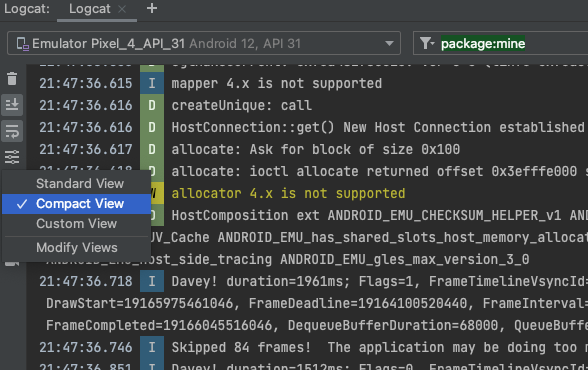
Switch between view presets
Logcat now allows you to quickly switch between different view modes—Standard, Compact, and Custom—by clicking . Each view mode provides a different default setting for showing you more or less information, such as timestamps, tags, and process IDs (PIDs). You can also customize each of these default view modes, as well as a custom view mode, by selecting Modify View.
New key-value search
In the previous version of Logcat, you had the option to either use string search (with support for regular expressions) or create a new filter by populating various fields using the Logcat UI. The first option made search more complex and the second option made sharing and setting up queries more difficult. We’ve now simplified the experience by introducing key-value searches right from the main query field.
This new query system provides accurate query results, without relying on regular expressions, as well as the ability to recall past queries from history, and share those queries with others. Additionally, you still have the option to use regular expressions and exclude logs based on key-values. Here are some examples of how to use the new query system, but you can also simply start typing in the query field to see suggestions:
You can also see a history of queries by clicking in the query field and selecting them from the drop down. To favorite a query so that it stays at the top of the list across all your studio projects, click the at the end of the query field.
Track logs across app crashes/restarts
The new Logcat now makes it easier to track logs from your app across app crashes and restarts, so that you don’t miss important logs across these events. When a Logcat notices that your app process has stopped and restarted you’ll see a message in the output—such as PROCESS ENDED and PROCESS STARTED—as shown below:
And, restarting Logcat preserves your session configuration, such as tab splits, filters, and view options, so that you can continue your session easily. We appreciate any feedback you might have with the new Logcat, which you can report here.
Android Studio - Chipmunk | 2021.2.1 Beta 4 is now available in the Beta channel.
If you already have an Android Studio build on the Beta channel, you can get the update by clicking Help > Check for Update (or Android Studio > Check for Updates on macOS). Otherwise, you can download it here.
For information on new features and changes in all preview builds of Android Studio Chipmunk, see the Android Studio Preview release notes. For details of bugs fixed in each preview release, see previous entries on this blog.
Android Studio - Dolphin | 2021.3.1 Canary 5 is now available in the Canary and Dev channels.
Android Studio - Dolphin | 2021.3.1 Canary 4 is now available in the Canary and Dev channels.
Android Studio - Chipmunk | 2021.2.1 Beta 3 is now available in the Beta channel.
Android Studio - Bumblebee | 2021.1.1 Patch 2 is now available in the Stable channel.
If you already have an Android Studio build on the Stable channel, you can get the update by clicking Help > Check for Update (Android Studio > Check for Updates on macOS). Otherwise, you can download it here.
General fixes and features
This update addresses for the following issues:
Android Gradle Plugin
Issue #213534628: Android Gradle Plugin 7.1.0-rc01 fails to perform ASM bytecode transformation during unit tests
Issue #210484302: Android studio 2021.1.1 beta5 . Gradle sync fails with "Unable to load class 'com.android.build.api.extension.AndroidComponentsExtension'."
Issue #194937528: Some new DSL blocks can't be used from Groovy DSL in Android Gradle Plugin 7.0.0
Issue #201080958: AGP 7.1 new publishing API: created javadoc jar does not get signed
Issue #216160972: ClassesDataSourceCache should use latest Asm version
Issue #217880219: Android Studio BumbleBee does not always deploy latest changes
C++ Build
Issue #216261600: ModelCache.safeGet(androidProjectResult.androidProject::getNdkVersion, "") must not be null
Code Editor
Issue #201148610: Bug in Android Studio Live Templates - the className() expression is not resolving the class name
D8/R8
Issue #210148618: java.lang.NoSuchMethodError: No static method $jacocoInit
Issue #210485236: Android test coverage broken due to Mockito error
Issue #211646483: Need workaround for broken CAS implementation on API 31
Issue #212279104: Sealed classes are not supported
Issue #215742573: NullPointerException when enabling horizontal class merging in Chrome
Issue #215337594: AbstractMethodError after virtual method merging
Issue #216208539: Failure to verify stack frames due to incorrect init-class out-type
Issue #213369062: Dex input uses a register that is not defined
Issue #216473340: StringBuilderOptimizerAnalysisTest is failing on release branches
Issue #217727847: Non-determinism in R8
Deployment
Issue #181004316: Running the project of a device owner application fails with "Couldn't terminate the existing process for" error message
Design Tools
Issue #206862224: Compose Previews fail to find resources from other modules when non-transitive R classes is enabled
Issue #216398612: Studio freezes on build.
Embedded Emulator
Miscellaneous performance and stability improvements.
Import/Sync
Issue #217589134: IDE error when launching Bumblebee: Output listing build file is not available for output type Apk in IdeBuildTasksAndOutputInformationImp
IntelliJ
Issue #216364005: Env variables not sourced when launched from Mac OS X to Monterey Dock
Jetpack (androidx) > Navigation
Issue #203559535: Upgrade SafeArgs to be built on latest stable AGP
Tools Windows
Issue #216194180: Can't run Android Device Manager
Issue #217765670: Network Inspector in BumbleBee doesn't show the api response in readable format
For information on new features and changes in all releases of Android Studio, see the Android Studio release notes.
We greatly appreciate your bug reports, which help us to make Android Studio better. If you experience a problem, let us know by reporting a bug. Note that you can also vote for an existing issue to indicate that it also affects you.



 博文
博文





